
State-of-the-Art Vehicle Routing Optimization Software with Integrated Post-Quantum Security
SQ-Optima plans optimal delivery routes across real road networks — sizing your fleet, honoring time windows and driver shifts, and balancing load across every vehicle. Give it addresses; it does the rest.
Optimize the whole plan
Cut distance, time, and vehicles at once — not one route at a time. SQ-Optima solves the fleet as a single problem.
Routes you can drive
Travel times come from real street networks and posted speed limits, so a plan on screen holds up on the road.
Real constraints
Time windows, capacities, driver shifts and breaks, cost ceilings, multiple depots — modeled, not approximated.
From spreadsheet to dispatch in three moves.
Bring the data you already have. SQ-Optima handles geocoding, road-network routing, and the optimization — then hands you a plan you can adjust and export.
Bring your data
Enter stops in the interface or upload CSV / Excel templates: one for depots, one for delivery stops, and — when you know your fleet — one for vehicles. Addresses are enough; coordinates are filled in automatically.
Optimize
The solver builds routes across the real road network, respecting every window, capacity, shift, and cost limit — accelerated on GPU and multicore CPU so large fleets solve in the time you have.
Review, refine, dispatch
Inspect routes on the map and timeline, drag stops between vehicles or adjust loads by hand, then export routes, stop lists, and turn-by-turn directions for the road.
However you run your fleet, it fits.
Know your vehicles or not, one truck type or many, a free count or a fixed one — SQ-Optima plans for the situation you’re actually in.
Let it size the fleet
Give a single vehicle capacity and let the optimizer decide how many vehicles the day needs. Ideal early in planning, before assignments are locked.
Capacity
Min. Vehicles
Plan a mixed fleet exactly
Describe each vehicle — capacity, shift, breaks, start and end locations, cost, type — and get routes that respect and constrains to every vehicle’s real limits.
Vehicle Profile
Fleet Assignment
Use the fleet you have
Need to put a specific number of vehicles on the road? Solve for exactly that count — request 40 even when 36 would do, and the plan spreads across all 40.
Vehicle Count
Balanced Assignment
Everything real routing has to account for.
Delivery days are full of constraints. SQ-Optima models them directly instead of forcing your operation to fit the tool.
Multiple Depots
Run one warehouse or many. Vehicles can start, return, or hand off across depots in a single plan.
Time Windows
Every stop can carry an open and close time, plus service time. Deliveries land inside the promised window.
Capacity & Load
Track load against each vehicle's capacity across the route, so nothing is over-packed and balance stays even.
Shifts & Breaks
Model shift start and end, maximum route time, and mandatory breaks so plans respect real hours behind the wheel.
Cost Ceilings
Set fixed and maximum cost per vehicle so the plan optimizes toward the economics you're accountable for.
Parallel Docks
Stops with several docks let multiple vehicles unload at once, so the plan uses the capacity a site really has.
Real-World Routing
Travel times follow actual streets and speed limits — not straight-line distance — so estimates hold up in traffic.
Address Geocoding
Type an address; SQ-Optima resolves the coordinates for you. No spreadsheets of latitude and longitude required.
Structured templates, nothing fussy.
Two files describe a job when you’re letting the solver size the fleet: your depots and your stops. Add a third — vehicles — when you want to plan against a known fleet. Fill the columns you have and leave the rest.
Coordinates are optional. Provide an address and SQ-Optima fills in longitude and latitude automatically, so your team never has to look them up.
stop_id,address,postal_code,load,service_time,start_time,end_time
D1,120 Harbour Rd,V6B 1A9,0,0,08:00,18:00stop_id,address,postal_code,longitude,latitude,load,service_time,start_time,end_time,number_of_docks
S1,44 Elm St,V5K 0A1,,,12,6,09:00,12:00,2vehicle_id,start_location,end_location,skip_first_trip,drop_return_trip,capacity,shift_start,shift_end,max_time,break_start,break_end,break_duration,vehicle_type,max_cost,fixed_cost
V1,D1,D1,false,false,180,07:00,16:00,540,12:00,13:00,30,van,900,120A working plan — not just an answer.
Every solve returns a map, a per-vehicle breakdown, and a timeline you can read, edit, and export. When you know the road better than the model, take over by hand.
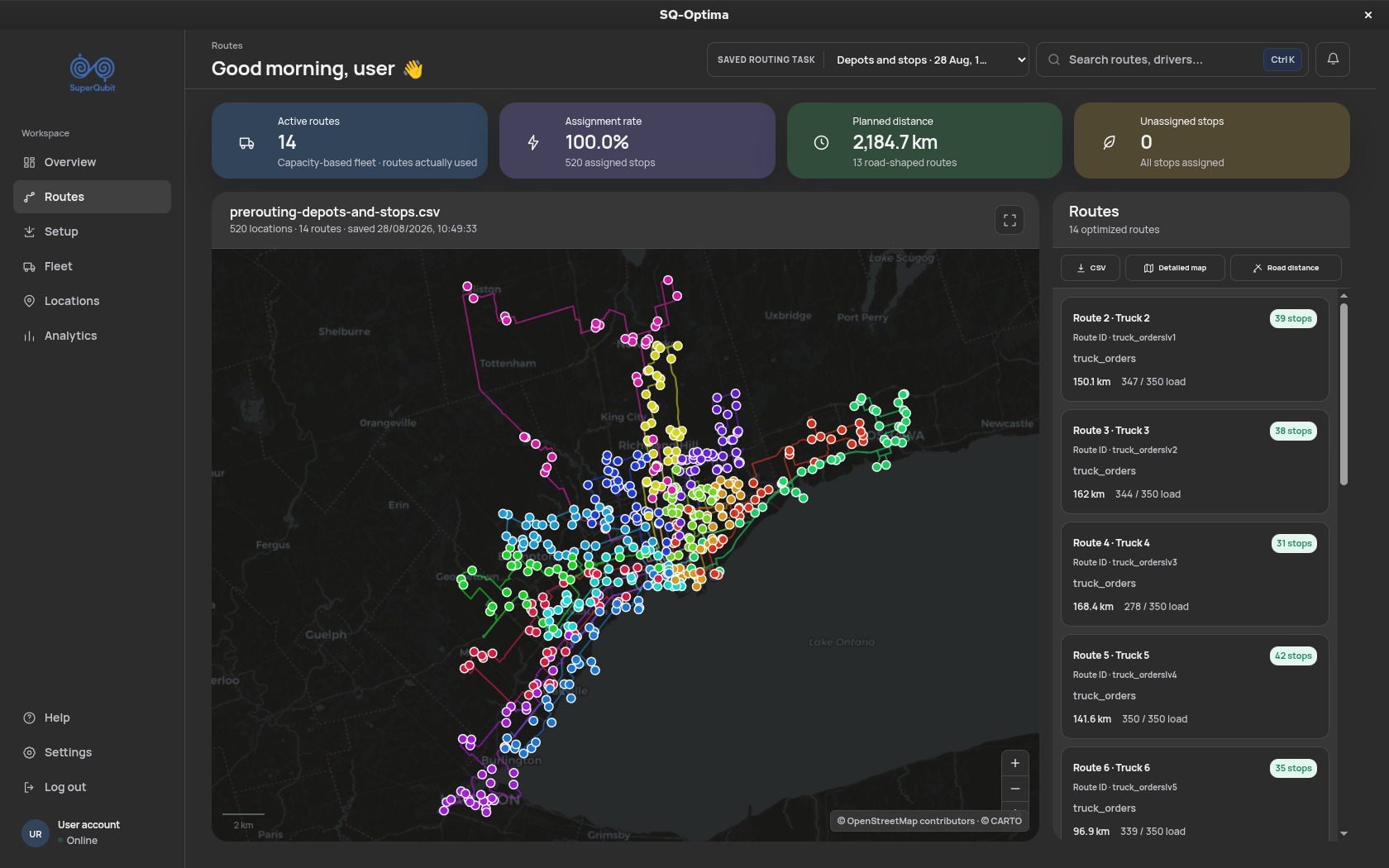
Routes drawn on the map
See every vehicle's path across the real network, color-coded and stop-numbered.
Per-vehicle stop lists
Ordered stops for each route, with load, arrival times, and the vehicle assigned to it.
Timelines & load over time
Watch each route unfold hour by hour — where the vehicle is, and how much it's carrying, at any point.
Drag-and-drop edits
Move a stop from one route to another, or change a load by hand — the plan updates around your change.
Exports & directions
Download routes and stop lists as CSV, with turn-by-turn directions ready for the driver.
Performance where you need it, protection where it matters.
Accelerated solving
SQ-Optima runs on GPU and multicore CPU together, so large fleets and dense stop lists solve inside the planning window you actually have — not overnight.
GPU
CPU Scaling
Large Fleets
Post-quantum cryptography
Traffic between your client and our servers is protected with post-quantum cryptography — your depots, stops, and fleet data stay confidential against both today’s threats and tomorrow’s quantum ones.
End-to-End
PQC
One platform. A classical and a quantum processor.
SQ-Optima solves on classical hardware today and can dispatch the hardest problems to real quantum hardware — with no change to how you work. The same depots, stops, and vehicles go in; comparable routes, timelines, and exports come back.
Runs your daily plans
GPU- and CPU-accelerated optimization handles everyday fleet planning at production speed — the workhorse behind every route you dispatch.
Takes on the hardest jobs
For the most complex problems, SQ-Optima prepares and runs the job on real quantum hardware, then returns results in the same map, timeline, and export you already read.
See SQ-Optima plan your routes.
Bring a real day of stops and fleet. We’ll show you the plan it produces — the routes, the savings, and the controls your dispatchers get.